
01 / THE INVITATION
01 / DISCOVER — THE PROBLEM
The real price of a plan isn't on the ticket.
Ticket listings tell you what's happening—not whether you can afford the night, get there, dress for it, or get home.
THE ORIGINAL QUESTION
“What if everything you needed to say yes was already on one screen?”
From the SideQuest concept showcase01
MoneyTicket price isn't the cost of the whole night.
02
TimeThe route, departure time, and preparation are easy to miss.
03
EnergyFinding something that fits your mood shouldn't take five apps.
THE GAP / MORE THAN EVENT DISCOVERY
The missing step was knowing whether to say yes.
The project began with my experience of opening 4–5 apps for one plan. Conversations with LA peers also surfaced uncertainty around costs and preparation.
THE USER STORY / VISION STORYBOARD
The night begins before you leave.
A story from the original project: an invitation, a moment of uncertainty, and a plan that makes the decision easier.
02 / THE FRICTION
Then come the questions.
03 / THE TURN
One place to see the plan.
04 / THE REAL WORLD
So saying yes feels easier.
ORIGINAL PHOTOGRAPHIC STORYBOARD / THE BIRTHDAYSee how it became a product
Vision-film storyboard from the original SideQuest process deck. Illustrative storytelling, not filmed user research or evidence of measured behavior.
IN-DEPTH / PERSONAS
Three lives. Three reasons to hesitate.
Different schedules, budgets and priorities shaped how SideQuest approaches real-world planning.
ECOSYSTEM / REFRAMED
A scattered decision system.
Four connected parts from the original product ecosystem map (SideQuest Edited, page 8).
01 / LOCAL EVENT FEEDWhat's on?Browse location-based events
02 / EVENT REALITY CARDCan I afford it?Total costs, routes, dress, duration
▦
SideQuest
One decision surface
03 / SAVE & SHAREWho's coming?Save the plan, share with friends
04 / ACTION HANDOFFMake it happen.Tickets, travel and reminders
SIMPLIFIED JOURNEY COMPARISON
From too many tabs to one informed decision.
Without SideQuest
See an eventCheck pricesOpen mapsGuess the vibeHesitate
With SideQuest
DiscoverReality cardComparePlanDecide
Illustrative journey paths based on the project's persona maps, not measured emotional outcomes.
02 / DEFINE — THE SOLUTION
One screen for the whole decision.
SideQuest brings real-world planning next to event discovery: what it costs, how to get there, and when to leave.
Show the full picture.
Include expected extras alongside ticket price, not after checkout.
Make next steps obvious.
From transport choices to when to leave, replace scattered calculations with a plan.
Respect real lives.
Match events to budget, availability, energy, location, and preferred atmosphere.
MVP / FROM PROJECT SCOPE
Four connected actions.
DiscoverBrowse relevant local events.
UnderstandRead the Event Reality Card.
Save + shareKeep the plan and bring someone along.
ActGo to tickets or transport booking.
IN-DEPTH / SERVICE DESIGN
What happens beyond the screen?
A condensed service blueprint from the project's discovery-to-report-back model.
IN-DEPTH / CIRCULAR FEEDBACK LOOP
A better estimate starts after the event.
The source deck proposes using reported spending to improve future estimates. Select a stage to explore how the user and system interact.
USER ACTION
Discover an event
Open SideQuest and browse a local event feed, filtering options by budget.
Based on the five-stage circular feedback loop in SideQuest Edited. Reporting and model refinement are proposed product capabilities, not validated production integrations.
03 / DESIGN
From finding something to actually going.
Move from early design decisions into the real app. Switch between five original screens; In-Depth mode shows the complete set.
FROM ZERO TO ONE / DESIGN PROCESS
Every screen came from a decision.
Research, rough flows, two testing rounds, and a working prototype—not just polished mockups.
Five initial participants; unclear sharing and filters.
Lo-fi screens, flows, persona maps, service blueprint.
Visible sharing, interactive filters, clearer system states.
Lovable + Supabase prototype; ten-person follow-up.
ORIGINAL WORK / THREE STAGES
Not just the final screen.
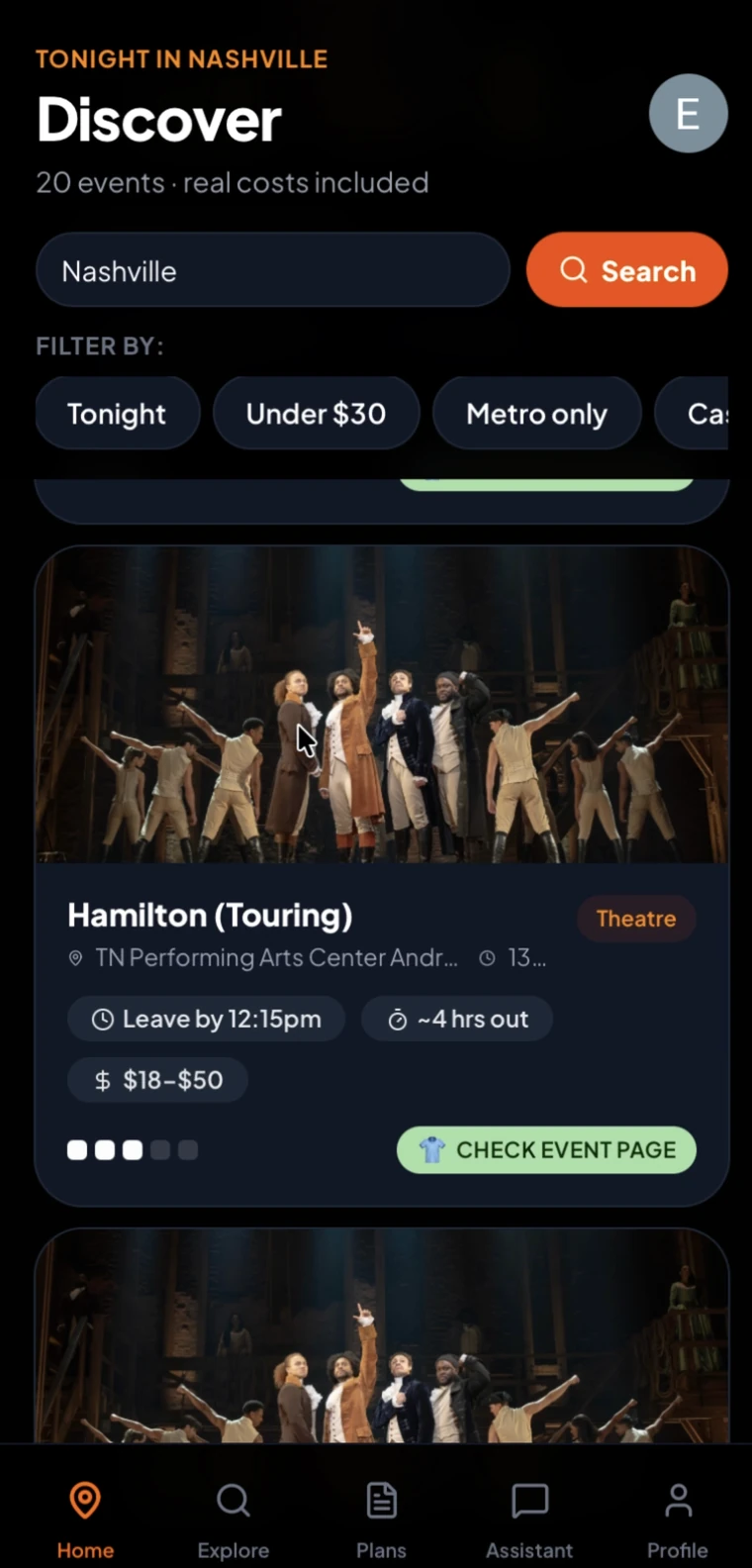
The original artifacts show the evolution from early flow decisions to visual prototypes and the working app.
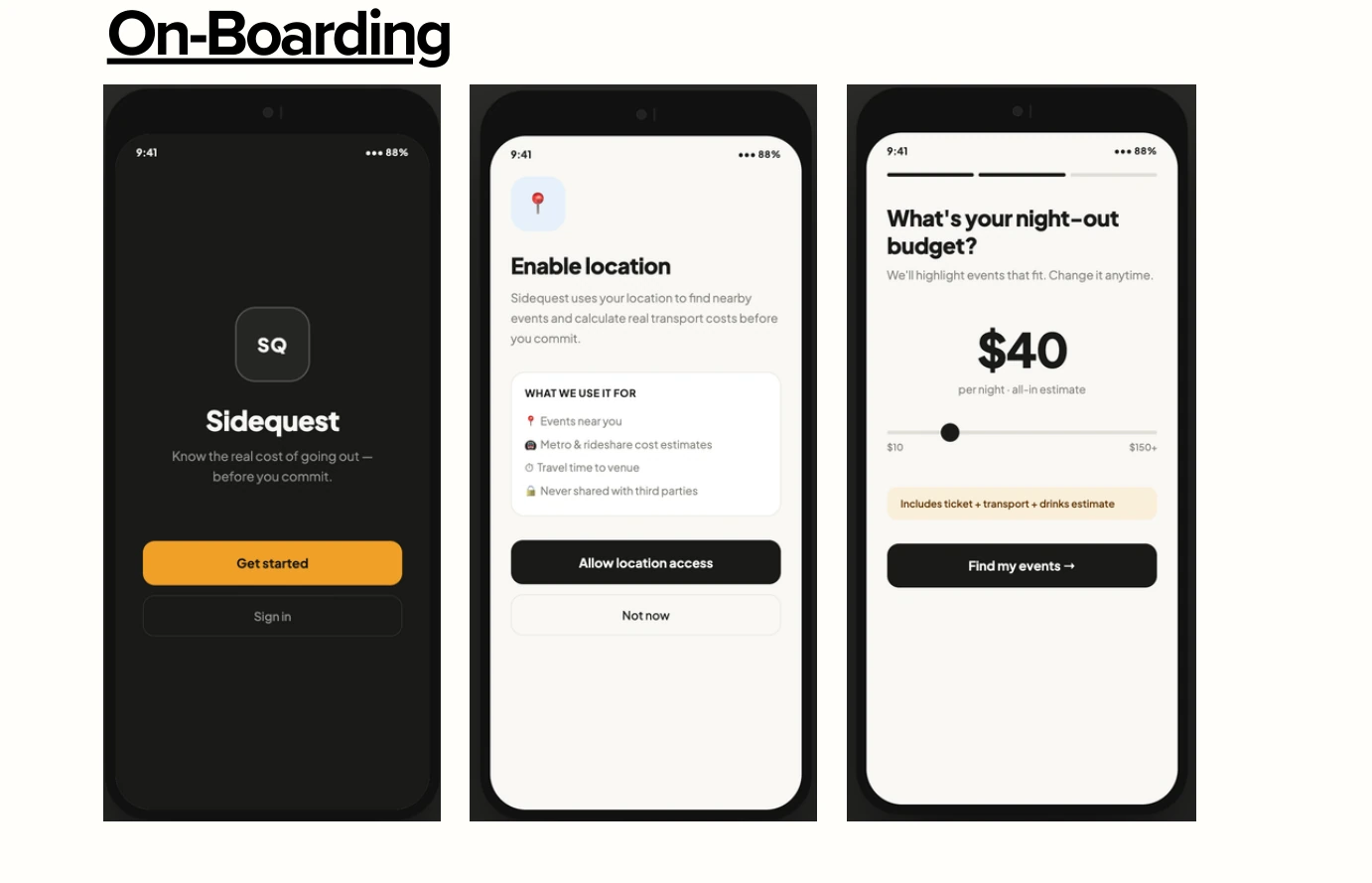
IN-DEPTH / LOW-FIDELITY EXPLORATION
Before the polish, the decisions.
Early grayscale screens explored how people discover an event, estimate the complete outing, and follow through on their plans.
01 / 06SET UP
9:41 ━━━━━━━━
STEP 2 OF 3
What's your night out budget?
We'll highlight events that fit. Change it anytime.
$30
per night · all-in estimate
Find my Events →
HomeExploreSavedProfile
Start with constraints.
Location and a nightly budget were introduced before showing events.
ONBOARDING02 / 06DISCOVER
9:41 ━━━━━━━━
Discover
Under $20 ⌕
TonightUnder $20Weekend
Showing 2 events under $20
Book Club Meeting $10
La La Land Showing $7
HomeExploreSavedProfile
Find a possible night.
Browse by category or filter down to affordable nearby events.
SEARCH + FILTERS03 / 06UNDERSTAND
9:41 ━━━━━━━━
Book Club Meeting
DTLA · Sat Apr 14 · Casual
COST SUMMARY
Ticket$5.00
Best transportMetro $2.50
Snacks$2.50
Total$10.00
View plan →
HomeExploreSavedProfile
Make the total visible.
The event card combines ticket, transport, and extra spending rather than ticket price alone.
EVENT DETAILS04 / 06COMPARE
9:41 ━━━━━━━━
Transport options
Book Club Meeting · DTLA
Metro (Line E)$2.50
34 min · cheapestUberX$14–18
18 min · surge variesLyft$13–17
18 minHomeExploreSavedProfile
Choose how to get there.
Travel time and estimated costs become a side-by-side decision.
TRANSPORT05 / 06FOLLOW THROUGH
9:41 ━━━━━━━━
Tonight · Book Club Meeting
Pre-event checklist
2 of 3 ready
✓Book packed
✓Ticket booked
Leave by 9:30 pm
I'm ready, let's go
HomeExploreSavedProfile
Turn intent into action.
Saved-event reminders and a simple checklist make the plan actionable before departure.
CHECKLIST06 / 06CLOSE THE LOOP
9:41 ━━━━━━━━
Night Complete!
How was Book Club @ DTLA?
What did you actually spend?
Ticket$5.00
Transport$2.50
Other$2.50
Total actual$10.00
Submit feedback →
HomeExploreSavedProfile
Compare estimates to reality.
The early flow included post-event ratings and actual-spend reporting.
FEEDBACKVisual reconstructions based on the original low-fidelity screenshots supplied for this case study. They clarify the early information architecture; they are not pixel-for-pixel screenshots or evidence of additional usability testing. The following section shows the later visual direction.
SCREEN 01 / 05
Find something worth going to.
Browse nearby events by category, location, and expected cost.
- Location-aware discovery
- Browse by category or filter
- Estimated costs on event cards
ORIGINAL DESIGN / THE INTERFACES
From discovering to doing.
Explore four key interfaces plus twelve additional high-fidelity screenshots, organized by actual user flow.
IN-DEPTH / TECHNICAL STRUCTURE
How the pieces connect.
Reconstructed from the documented architecture and database diagrams. Relationships are simplified for readability.
FRONT ENDLovable / ReactBrowser + mobile UI
⇄
BACK ENDSupabasePostgreSQL + REST API
Eventstitle · ticket · dress · energy
Transport optionsmode · cost · time · route
Userscity · budget · preferences
VISUAL DESIGN & CONTEXT
The interface in everyday moments.
Six real-world contexts reframed as a coherent visual system rather than pasted slides.
IN-DEPTH / CONTEXTUAL SCENARIOS01 / COORDINATION 02 / FINANCES 03 / DISCOVERY 04 / DAILY CONTEXT 05 / IN TRANSIT 06 / COORDINATION
The decision starts before going out.
Situations explored in the supplied contextual and environmental mockups:
Friday plan text
Friends suggest a concert, but nobody knows the real cost or when to leave.
Budget check
Can someone afford the full evening, not just the ticket?
Spontaneous Saturday
A free evening still leaves the question of what to do.
At the office
Deciding after work before replying to the group chat.
On the commute
Checking whether plans are feasible while traveling.
Group planning
Share a cost estimate with friends before everyone commits.
PRODUCT COLORS
Near black · surface gray · orange accent · white · muted gray
MOTION FROM THE DECK
Cards enter upward (300 ms), steps slide directionally, and confirmations use a spring-in (400 ms). The portfolio's own motion is deliberately gentler.
04 / ITERATE
Test the path. Find the friction.
Two usability rounds shifted the focus from initial navigation to more meaningful questions: Can someone trust the cost estimates? Can they share a plan? Does the assistant understand their context?
ROUND ONE / 5 UNIVERSITY STUDENTS5
Initial in-person usability interviews, ages 20–27
3/5Looked in the wrong place for sharing
2/5Missed the filter chips at first
DESIGN RESPONSE
Move sharing into the card header and sticky action area. Label filters, add visible affordances, and include loading, empty, and error states.
OBSERVATION → CHANGE
Make the next action harder to miss.
A share button at the top of the event card—and again in the sticky CTA—matches where participants naturally looked. Clearer filters signal that those chips are interactive.
TEST → DESIGN RESPONSE
The details people couldn't find.
Visual excerpts of the original before-and-after tests—cropped to feature the interfaces rather than the slide layout.
IN-DEPTH / ROUND ONE
Three task averages.
The initial test reported difficulty ratings and qualitative observations; these are not before-and-after performance gains.
ROUND TWO / 10 UNIVERSITY STUDENTS
The harder questions came later.
Second-round testing examined discovery, cost confidence, sharing, city/transport context, and the assistant. Average difficulty was self-reported on a 1–5 scale (5 = hardest).
DISCOVERY2.0 / 5
COST CONFIDENCE3.0 / 5
SHARING2.0 / 5
CITY + TRANSPORT2.8 / 5
ASSISTANT3.0 / 5
6 of 10
Questioned the source of transport and drink estimates.
6 of 10
Noted the assistant asked for their city again.
3 of 10
Wanted an actionable departure-time recommendation.
IN-DEPTH / SECOND-ROUND PRIORITIES
What I'd address next.
These are research-led follow-ups recorded in the project—not all completed features.
HIGHGive cost estimates a source.
Show how ticket, transport, and drink figures were produced.
HIGHCarry the user's city into the assistant.
Don't ask for information the app already has.
LOWRecommend when to leave.
Convert travel time into a practical departure moment.
FOLLOW-UPRepair unreliable sharing.
Reported glitches and refreshes need explicit regression testing.
05 / OUTCOME & NEXT
The outcome: a clearer decision.
SideQuest developed from an event-discovery idea into a prototype about informed decisions. Testing surfaced meaningful navigation improvements—and unresolved questions about trust, personalization, and accuracy.
Discovery needs context.
A feed becomes more useful when people can quickly compare budget, travel, energy, and timing.
Visibility changes behavior.
Sharing and filtering can't depend on users knowing where hidden controls live.
Trust needs evidence.
Showing a cost is different from explaining where it came from—and people noticed.
WHAT THE TESTING DOES — AND DOESN'T — SHOW
Two small student samples revealed specific usability issues. They do not establish event attendance gains, more accurate costs, improved spending outcomes, or population-wide adoption. Those claims would require more representative testing and real usage data.
IN-DEPTH / FUTURE VISION
Where the digital plan meets the real world.
The deck's proposed IoT direction extends the experience beyond a phone. This is a future integration concept, not a deployed hardware product.
Smartwatch haptics, car navigation handoff, and actual-spend reporting are prospective ideas in the design materials.
SIDEQUEST / NEXT STEPS
Prototype URLs were listed in the original project deck; external availability and live integration data have not been independently verified.
A little more confidence before the first step.
Explore the original project artifacts and prototypes, or return to the other case studies.